
В этом руководстве вы узнаете, как получить текущее вычисленное измерение элемента, включаемое ширину и высоту, в JavaScript.
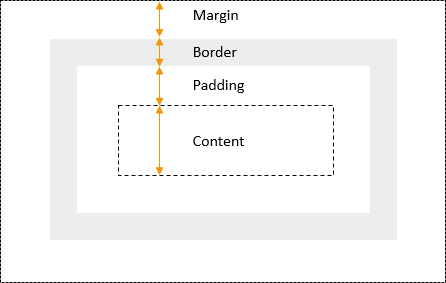
На следующем рисунке показана модель CSS, которая включает блочный элемент с содержимым, отступами, границей и полем:
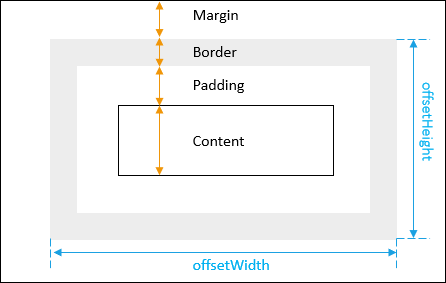
Чтобы получить ширину и высоту элемента, включая отступ и границу, вы используете offsetWidth и offsetHeight элемента:
let box = document.querySelector('.box');
let width = box.offsetWidth;
let height = box.offsetHeight;
На следующем рисунке показаны offsetWidth и offsetHeight элемента:
Пример:
<!DOCTYPE html>
<html lang="en">

<head>
    <meta charset="UTF-8">
    <meta name="viewport" content="width=device-width, initial-scale=1.0">
    <title>Getting the Width and Height of an Element</title>
</head>

<body>
    <div class="box" style="width:100px;height:150px;border:solid 1px #000;padding:10px"></div>
    <script>
        let box = document.querySelector('.box');
        let width = box.offsetWidth;
        let height = box.offsetHeight;
        console.log({ width, height });
    </script>
</body>

</html>
Выход:
{width: 122, height: 172}В этом примере:
- Ширина 100px.
- Граница составляет 1 пиксель с каждой стороны, поэтому 2 пикселя для обеих сторон.
- Отступы 10 пикселей с каждой стороны, поэтому 20 пикселей для обеих сторон.
Поэтому общая ширина 12px. Точно так же высота составляет 172 пикселя.
Чтобы получить ширину и высоту элемента в виде числа с плавающей запятой после преобразования CSS, вы используете метод getBoundingClientRect() DOM элемента.
Пример:
<!DOCTYPE html>
<html lang="en">

<head>
    <meta charset="UTF-8">
    <meta name="viewport" content="width=device-width, initial-scale=1.0">
    <title>Getting the Width and Height of an Element</title>
</head>

<body>
    <div class="box" style="width:100px;height:150px;border:solid 1px #000;padding:10px"></div>
    <script>
        let box = document.querySelector('.box');
        let width = box.offsetWidth;
        let height = box.offsetHeight;
        console.log({ width, height });

        const domRect = box.getBoundingClientRect();
        console.log(domRect);
    </script>
</body>

</html>
Выход:
{width: 122, height: 172}

DOMRect {x: 7.997685432434082, y: 7.997685432434082, width: 121.95602416992188, height: 171.95602416992188, top: 7.997685432434082, …}
clientWidth и clientHeight
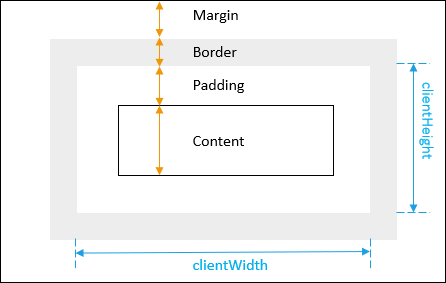
Чтобы получить ширину и высоту элемента с отступом, но без рамки, используйте clientWidth и clientHeight :
let box = document.querySelector('.box');
let width = box.clientWidth;
let height = box.clientHeight;
На следующем рисунке показаны clientWidth и clientHeight элемента:
Чтобы получить поле элемента, используйте метод getComputedStyle():
let box = document.querySelector('.box');
let style = getComputedStyle(box);

let marginLeft = parseInt(style.marginLeft);
let marginRight = parseInt(style.marginRight);
let marginTop = parseInt(style.marginTop);
let marginBottom = parseInt(style.marginBottom);
Чтобы получить ширину границы элемента, используйте свойство объекта style, возвращаемое методом getComputedStyle() :
let box = document.querySelector('.box');
let style = getComputedStyle(box);

let borderTopWidth = parseInt(style.borderTopWidth) || 0;
let borderLeftWidth = parseInt(style.borderLeftWidth) || 0;
let borderBottomWidth = parseInt(style.borderBottomWidth) || 0;
let borderRightWidth = parseInt(style.borderRightWidth) || 0;
Чтобы получить высоту и ширину окна, вы используете следующий код:
let width = window.innerWidth || document.documentElement.clientWidth || document.body.clientWidth;
let height = window.innerHeight || document.documentElement.clientHeight || document.body.clientHeight;